
rqlite is a lightweight, open-source, fault-tolerant relational database built on SQLite and Raft. Version 10 is out now.
rqlite uses SQLite as its storage engine and has a particular relationship with the SQLite Write-Ahead Log (WAL). SQLite, left to itself, manages its own WAL: it checkpoints when the WAL grows, it checkpoints when the last connection closes, and it decides when frames move from the WAL into the main database file.
That is a problem for rqlite. In rqlite, the WAL is not just a SQLite implementation detail. It is a core part of how rqlite operates. If SQLite checkpoints the WAL at the wrong time, rqlite can no longer rely on the WAL as the incremental state it needs to track.
To understand better why rqlite works the way it does, and also learn something about SQLite WAL internals, let’s dig into the problem rqlite has to solve. It’s an interaction between SQLite and the Raft Consensus system that took years to get right.
Raft has One Goal
 Conceptually Raft has one goal: create a log of changes to a State Machine and ensure that that log is perfectly replicated across a group of machines. That’s it. Everything else flows from this fact.
But if this log is going to store every event — and in rqlite an event is a SQL statement and the State Machine is the SQLite database — what prevents the log growing without bound? Raft has an answer for that — it’s called snapshotting. Snapshotting means that Raft periodically requests a copy of the State Machine, persists it to disk, and then deletes all the logs reflected in that copy. Every practical Raft-based system must implement a snapshotting mechanism.
rqlite is built on the HashiCorp Raft library. The HashiCorp library provides a default snapshotting approach but lets applications supply their own. rqlite once used the default. It no longer does, and that is where the SQLite WAL comes in.
Snapshotting SQLite
Early versions of rqlite snapshotted SQLite in a simple way. When Raft requested a snapshot rqlite provided it with a consistent copy of the entire SQLite database. This was very robust, but had one obvious shortcoming: if you have a 2GB database and change a few hundred rows, copying the entire 2GB to capture just those changes in the snapshot is pretty wasteful. As rqlite deployments grew into the multi-gigabyte range, this approach became impractical.
Fortunately SQLite provides a solution: the WAL. When running in WAL mode, SQLite writes all changes to the WAL, as a sequence of frames — each frame holding one modified database page. The data only moves from the WAL back into the main database file when SQLite performs a checkpoint. Between checkpoints, the WAL contains exactly the changes made since the last checkpoint.
rqlite takes advantage of the WAL as follows: when Raft requests a snapshot, rqlite copies the current WAL and hands that copy to Raft. rqlite then checkpoints the WAL into the main SQLite database file. The WAL starts empty again, ready to accumulate the next batch of changes. So at any moment, the WAL contains exactly the unsnapshotted SQLite state relative to the last accepted Raft snapshot. That does mean we need a Snapshot Storage system that can receive a sequence of WAL files, as opposed to self-contained copies of the database. That’s a distinct challenge, but one I will leave for a future post.
None of this happens automatically. SQLite, left to itself, would manage the WAL on its own schedule — and that schedule is the wrong one for rqlite.
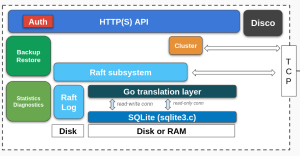
How rqlite takes control of the SQLite WAL
SQLite is well-designed software: it works perfectly for most use cases as-is, but it still allows rqlite to exercise the control it needs. That does not require patching SQLite. It requires configuring SQLite so that checkpointing only happens when rqlite asks for it, and preventing users from issuing commands that would violate that contract:
- Disabling all automatic checkpointing, so SQLite does not move WAL frames into the database file without rqlite knowing.
- Trapping any user-issued
PRAGMAthat would checkpoint or change the WAL mode, and instead returning an error. - Explicitly disabling checkpoint-on-close. While not strictly necessary, doing so permits fast restart times — how this works will be explained later.
From then on rqlite drives checkpointing itself. It issues explicit checkpoints as part of the snapshotting process, always requesting a TRUNCATE checkpoint but being ready for that to fail. What is a TRUNCATE checkpoint? It is a checkpoint operation that truncates the WAL file to zero bytes after a successful checkpoint. But this operation can fail to complete. How rqlite prepares for that failure is one of the more interesting parts of rqlite’s database layer.
Welcome to the Real World
That was the ideal path. Let’s now take a look at the practical issues rqlite also has to solve.
It always starts with a full copy
WAL snapshots are incremental. That means they need a base. The first snapshot in a chain must therefore be a full copy of the SQLite database. After that, rqlite can snapshot only the WAL frames written since the previous snapshot. In practice, the initial full snapshot is fast because a new node usually has little SQLite state to copy. But any later full snapshot could involve copying much larger amounts of data, so rqlite tries hard to avoid them.
Rare edge cases can break the chain and force the next snapshot to be full. One situation was when Raft requested a snapshot, but the most recent change to a rqlite system was a change in cluster membership. For technical reasons this meant SQLite would be snapshotted, the snapshot aborted, and the WAL discarded. As a result a full snapshot would be scheduled. But the machinery that keeps the chain alive under adverse conditions has been greatly improved in v10, and reverting to full snapshots will almost never happen – including during such membership changes.
When readers get in the way
 The discussion of Raft snapshotting, up until this point, has omitted a critical detail: during the snapshot process writes to rqlite are blocked. Why? Because Raft needs a consistent snapshot, synchronized with its log, and blocking writes is the best way to guarantee this. This means that rqlite needs an always-fast snapshotting process.
What could slow down snapshotting? Well, if there has been a lot of new data inserted since the last snapshot then rqlite will have more to copy to Raft — and this will result in writes being blocked for longer. Operators can mitigate this by increasing the rate of snapshotting — writes are blocked more often but each period is much shorter. But there is a second type of access that can block snapshotting, and it’s got to do with the way SQLite itself works.
In SQLite a reader can block a WAL checkpoint running to completion, so rqlite wants to minimize the amount of time it waits for any blocking reader to finish. It does this by waiting up to 250ms by default. If the reader hasn’t completed its work by then, SQLite will give up and return an error to rqlite. Since rqlite always requests a TRUNCATE checkpoint – it requires that the WAL file be zero bytes after the checkpoint — a failed checkpoint operation will leave the SQLite database in one of two states:
SQLite cannot checkpoint all WAL frames
In this case at least one reader was reading from somewhere other than the last frame in the WAL.
In this case SQLite can’t move all WAL frames back to the main database file since doing so could break read isolation i.e. the reader would see data change underneath it mid-query. This failure is easy for rqlite to handle. While SQLite checkpointed only some frames back to the main database file, SQLite has not reset the WAL – meaning the next writes to the database will be appended to the WAL file. This is critical since it means the WAL will continue to contain all writes since the last successful snapshot. rqlite can signal back to Raft that the snapshot process has failed and Raft will simply retry it again later.
The harder case: SQLite checkpoints the frames but cannot truncate the WAL
When this happens it means all readers were reading from the last frame in the WAL.
This is the more interesting case. In this situation all the frames in the WAL were moved back into the main database, but the WAL file was not truncated. Will the WAL be reset on the next write? rqlite won’t know until the next write to the SQLite database – but that will be some unknown point in the future. Should it consider the snapshot failed? This is the crucial question. What rqlite does in this case is to carry on as though the snapshot was successful. It provides the WAL data to the Raft snapshot system, but records the salt values in the WAL header, and the length of the WAL. In SQLite’s WAL format, the salt values distinguish one WAL generation from another.
On the next snapshot, rqlite examines the WAL. If the salt values have changed, SQLite reset the WAL and subsequent writes started at the beginning of the file. If the salt values have not changed, subsequent writes were appended after the offset rqlite recorded during the previous snapshot. It can then read WAL frames starting from the correct offset in the WAL it recorded during the previous snapshot operation.
Why go to all this trouble?
Earlier versions of rqlite recognized all this could happen, but dealt with it in a simpler manner. It used a two-step approach:
- Wait much longer – up to five minutes by default — for any reader to complete and unblock the checkpoint. Obviously this was a crude approach, but in practice most reads of rqlite are very short.
- If the checkpoint still failed, exit the process. This meant the node would rebuild its state from the Snapshot Store on startup.
v10 changes this behavior substantially. Either snapshots are fast, or they are aborted, to be retried a few seconds later. Snapshots — and therefore writers — are no longer excessively blocked by slow readers, because the system has a strategy for the case where readers prevent WAL truncation.
 Lifting the Lid on the WAL
Once you start to understand SQLite at this level, you find uses for that understanding you did not plan for.
Compacting the WAL
At snapshot time the WAL contains all the changes since the prior snapshot — specifically all modified database pages. If you walk the WAL you find page after page of database data. But this is where it gets interesting: often the same page number is present in the WAL multiple times. And during a checkpoint operation pages transferred later to the database will overwrite pages transferred earlier. When checkpoint completes only the last instance of a given page will be present in the database.
This insight leads to WAL Compaction. rqlite doesn’t just copy the WAL during snapshotting — it creates a copy which retains only the last version of any given page number. And the compacted copy is what gets handed to Raft. It means much less data is transferred to Raft during the snapshot process, which in turn means the Raft Snapshot Store has a smaller disk footprint. Even simple testing shows that a compacted WAL may be one hundred times smaller than the original WAL.
To be clear, compaction is an optimization, not a correctness mechanism. A snapshot built from the uncompacted WAL would produce the same state in the Snapshot Store. The compacted WAL is just smaller and easier to handle.
Faster Restarts
In all Raft-based systems, it is Raft itself which is the source of truth. The State Machine – the SQLite database in the case of rqlite – can be rebuilt from scratch at any time. Specifically, it is the combination of the last snapshot (if any) and any Raft Log Entries which is the source of truth.
This leads to systems that are easy to reason about and easy to recover – but it can mean rqlite is slow to restart when managing multi-GB datasets. The restart means the database must be copied from the Snapshot Store and then any remaining logs applied. But is this entirely necessary?
In fact it’s not necessary, but it requires a little bit of careful programming.
When rqlite snapshots the current database state, the last step is to calculate a checksum of the SQLite database file. It then stores this checksum in a sidecar file, alongside the main database file. On restart, rqlite recalculates the checksum of the SQLite file, compares it with that stored in the sidecar, and if they match skips the restoration from the Snapshot Store entirely. It does this because it knows it already has the right database state in place. As a result systems even with multi-GB datasets restart in seconds.
The first step in snapshotting is to delete the sidecar – this means that if rqlite crashes during snapshotting, on restart it will simply recover from a known good snapshot. It’s a nice example of a single design detail meeting two requirements simultaneously.
This is also why checkpoint-on-close had to be disabled. If SQLite checkpointed the WAL when the last connection closed (when rqlite shut down), the SQLite file would be modified after the sidecar checksum was written. On the next restart the checksum would not match, and the fast-restart path would never fire. The point earlier in this post that mentioned this – disabling checkpoint-on-close for “fast restart times” – is what we just described.
Because Surely This is Tested
rqlite is extensively tested, but even then it’s important to recognize rqlite uses SQLite in a way the original designers may not have considered. Let’s look at two examples of how rqlite ensures it is working as designed.
Asking SQLite to check our work
SQLite supports integrity checking, so rqlite can ask SQLite to check its work. During unit and integration testing, rqlite continually executes a full integrity check on the consolidated database in the Snapshot Store. However, running an integrity check on a large database would take substantial time, so it’s disabled in production builds. But if anything in the WAL pipeline is incorrect – the compacting scanner, the writing to disk, the processing that takes place within the Snapshot Store – this testing would catch it.
Testing our assumptions
How can we be sure SQLite actually operates the way rqlite assumes? We test. One example is ensuring that SQLite actually does not checkpoint-on-close. For every behaviour rqlite relies on in SQLite, a test exists to make sure reliance is warranted.
Next Steps
If you’re interesting in using rqlite be sure to download rqlite 10.0 and try it out today. Check out the docs and discussion is welcome on Slack.
Credits
Ben Johnson’s Litestream showed that reading the SQLite WAL outside SQLite was a viable approach and he gave me a few pointers along the way!